Your cart
Your cart is empty
Continue shopping
Drawer menu

Walk into a modern classroom today and you'll notice something remarkable: half the students may be sitting at desks, while the other half are logging in from homes, hostels, or even different cities. This is hybrid learning — and it has quietly become the default expectation for schools, coaching institutes, universities, and corporate training centres across India and around the world.
But here's the uncomfortable truth most institutions discover the hard way: hybrid teaching fails without the right infrastructure. A laptop webcam pointed at a whiteboard, a built-in microphone picking up ceiling fan noise, and a shaky internet connection do not make a hybrid classroom. They make a frustrating experience for everyone — the teacher, the students in the room, and especially the students online.
That's where a professional Hybrid Class Studio Setup comes in. In this detailed guide, we'll walk you through everything you need to know: what a hybrid class studio actually is, the essential equipment it requires, how to design the room, the mistakes to avoid, and how Benchmark Technomate helps institutions build broadcast-quality hybrid classrooms without the guesswork.
A Hybrid Class Studio Setup is a purpose-built teaching environment that allows an educator to teach in-person and remote students simultaneously, with equal quality for both. It combines:
The keyword here is equal quality. In a traditional online class, remote students are the priority. In a traditional classroom, in-person students are. A true Hybrid Class Studio Setup refuses to compromise on either — the student in the last bench and the student 500 kilometres away both get a front-row experience.
Think of it as the difference between a phone call and a television broadcast. Both transmit your voice, but only one is engineered to hold an audience's attention for an hour.
Also Read: Benchmark Digital Panel Without OPS: Complete Online Class Studio Setup
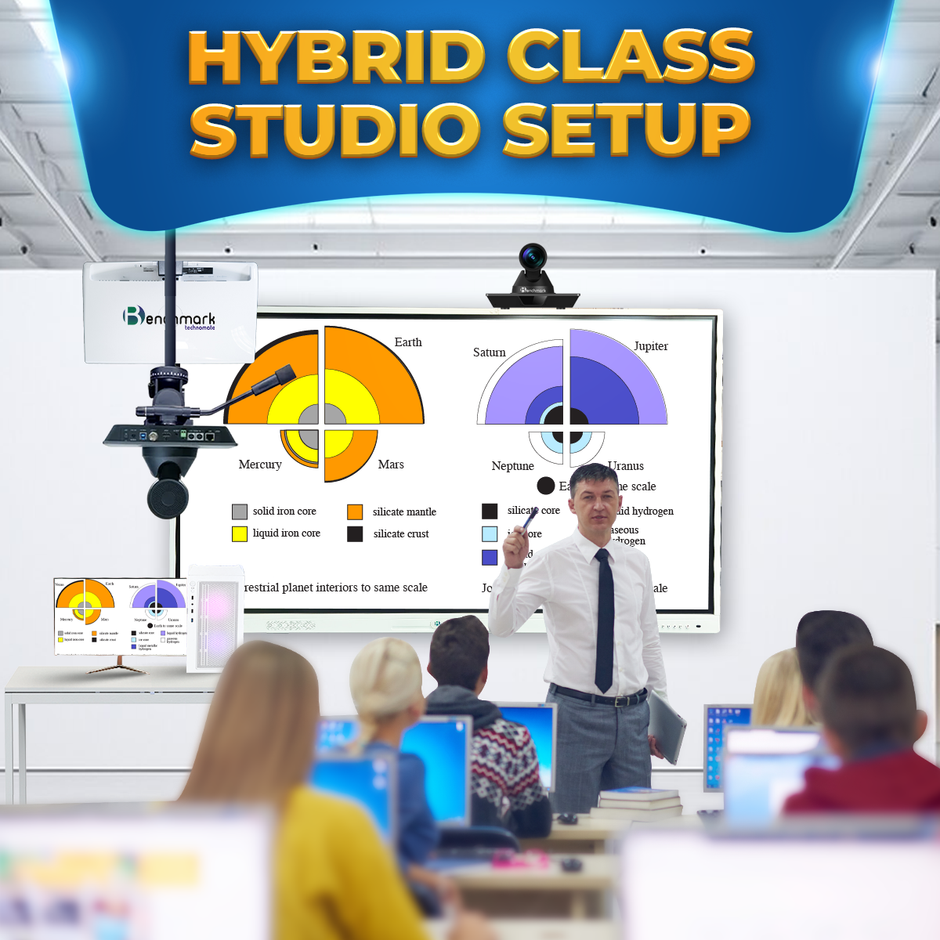
Some institutions still treat hybrid infrastructure as a temporary, pandemic-era expense. The data — and student behaviour — say otherwise.
Learners have tasted the convenience of attending a lecture from anywhere, rewatching recordings before exams, and never missing a class due to travel or illness. Institutions that can't offer this flexibility increasingly lose admissions to those that can.
A coaching institute in Kota, Pune, or Hyderabad with a proper Hybrid Class Studio Setup can enrol students from any city in India — or any country in the world — without opening a single new branch. One well-equipped studio classroom effectively multiplies your catchment area infinitely.
Every hybrid class, when captured professionally, doubles as reusable content: revision material, marketing clips, YouTube lectures, and paid course libraries. A single hour of teaching becomes an asset that keeps earning long after the class ends.
Instead of repeating the same lecture across multiple batches and branches, your best educators teach once — to everyone. That's a direct multiplier on your most expensive and most limited resource: great teaching talent.
The institutions winning in this new landscape aren't the ones with the most branches. They're the ones with the best-engineered hybrid classrooms.
Also Read: Benchmark Rainbow Platinum Pack: Complete Studio Setup for Teachers & Creators
Let's break down the essential building blocks, piece by piece. This is where most institutions get lost — and where getting expert guidance from a specialist like Benchmark Technomate saves both money and months of trial and error.
The interactive flat panel (IFP) replaces the blackboard, whiteboard, and projector in one device. It's the surface the teacher writes on, the screen in-room students watch, and — critically — the content source that streams in perfect digital clarity to remote students.
What to look for:
Benchmark Technomate's interactive panels, such as the Alpha series, are engineered specifically for this use case — with 0% hang engineering so a live hybrid session never freezes mid-lecture. When 200 remote students are watching, a frozen screen isn't an inconvenience; it's a refund request.
Here's why the IFP matters so much for hybrid specifically: when a teacher writes on a digital panel, that content can be captured directly as a digital signal — not filmed through a camera. Remote students see razor-sharp handwriting, not a blurry, glare-covered whiteboard shot from across the room. This single change transforms the online learning experience.
PTZ stands for Pan-Tilt-Zoom — cameras that can rotate, tilt, and zoom remotely or automatically. In a hybrid class studio, cameras do the job of a television camera crew.
A professional setup typically uses two cameras:
Why two cameras? Because visual variety keeps remote students engaged. Cutting between a wide shot of the classroom and a close framing of the teacher mimics the production style of professional broadcasts — and it measurably reduces online drop-off. A static single angle, no matter how good the camera, starts to feel like CCTV footage after twenty minutes.
Ask any experienced online educator and they'll tell you the same thing: students forgive average video, but they never forgive bad audio. The moment a voice becomes muffled, echoey, or inconsistent, remote students disengage or leave.
A complete audio chain for a Hybrid Class Studio Setup includes:
Benchmark Technomate bundles studio-grade microphones into its studio packages precisely because audio is where DIY setups most often fail. A ₹2,000 microphone plugged into a ₹5 lakh setup will make the whole system sound like a ₹2,000 setup.
Classroom tube lights were designed for reading, not for cameras. On video, they create harsh top-down shadows, uneven skin tones, and a dull, lifeless picture.
Professional studio lighting for a hybrid classroom includes:
Good lighting does something subtle but powerful: it signals professionalism. Remote students subconsciously judge the quality of teaching by the quality of the picture. Well-lit educators are perceived as more credible, more prepared, and more worth paying attention to.
Also Read: Benchmark Podcast Microphone | Best Mic for Podcast Studio
Behind every smooth hybrid class is a computer doing heavy lifting: encoding video from multiple cameras, mixing audio, running the meeting platform, recording the session, and often streaming to YouTube or an LMS simultaneously.
A dedicated studio server — such as the Windows 11-based Benchmark server included in Benchmark Technomate's studio packs — paired with a control monitor gives the teacher or an operator a mission-control desk:
Trying to run all of this on the teacher's personal laptop is the most common cause of mid-class crashes. Dedicated hardware isn't a luxury in a hybrid studio — it's the foundation of reliability.
All of the above depends on one thing: bandwidth. A Hybrid Class Studio Setup needs:
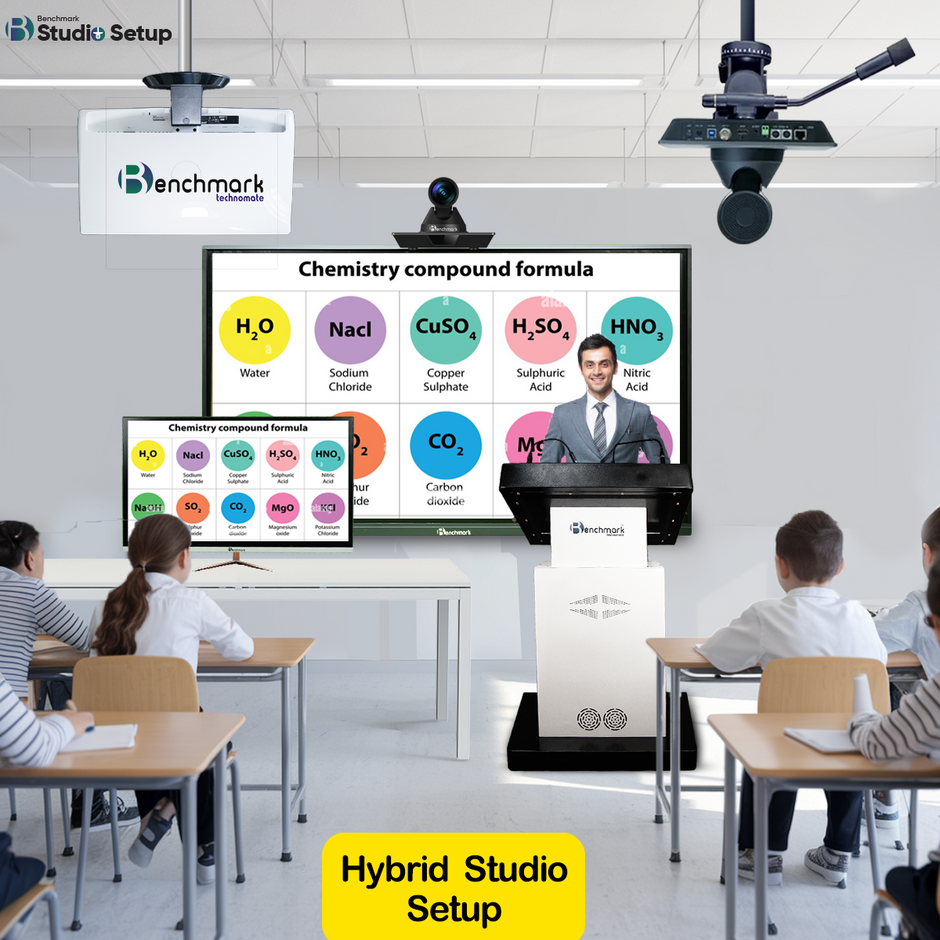
Equipment is only half the equation. The room itself must be designed so both audiences — physical and remote — are served.
Teaching zone placement. Position the interactive panel and teaching area so the primary camera captures the teacher and panel together in one clean frame, with the teacher never blocking the board from the camera's angle.
Camera positioning. The primary camera should sit at roughly eye level of a seated student, 3–5 metres from the teaching zone. Mounting cameras too high creates an unflattering surveillance-style angle that subtly distances remote viewers.
Student seating. Arrange in-room seating so students don't walk through the camera frame, and so a camera can capture the class when in-room students ask questions — remote learners should feel the energy of the room, not just watch a lone teacher.
Acoustic considerations. Hard parallel walls create echo. Curtains, carpets, acoustic foam panels, and even filled bookshelves absorb reflections. Aim to make the room sound slightly "dead" — that's exactly what microphones love.
Lighting placement. Key lights at 45-degree angles to the teacher's face, positioned above eye line, with fill lighting to soften shadows. Avoid placing the teacher in front of windows, which turn them into a silhouette.
Cable management and power. Plan conduit paths, surge protection, and a UPS for the server and panel. A hybrid studio has 10–15 powered devices; tangled extension boards are both a safety hazard and a reliability risk.
Here's the practical sequence institutions should follow:
Having helped hundreds of institutions go hybrid, specialists like Benchmark Technomate see the same avoidable errors repeatedly:
Schools — to run parallel online sections, serve students during illness or disruption, and share specialist teachers across campuses.
Coaching institutes — to scale star faculty beyond a single classroom, enrol out-of-city students, and build recorded course libraries that generate revenue year-round.
Colleges and universities — to support blended degree programs, guest lectures from global experts, and NEP-aligned flexible learning models.
Corporate training centres — to onboard and upskill distributed teams with the engagement of an in-person session and the reach of a webinar.
EdTech creators and online educators — to produce professional content that stands out in a crowded market where production quality directly affects subscriptions and sales.
There's no shortage of AV vendors. What makes Benchmark Technomate different is specialisation: hybrid teaching and content-creation studios are not a side business — they're the core of what the company builds.
Complete, pre-matched ecosystems. From the Alpha series interactive panels to 4K PTZ cameras, AI-tracking cameras, professional studio lighting, Sennheiser audio, and dedicated Windows 11 servers — every component in a Benchmark studio package is selected and tested to work as one system. No compatibility roulette, no multi-vendor blame games.
Built for Indian classrooms. Equipment engineered and supported for Indian power conditions, internet realities, classroom sizes, and budgets — with packages scaling from compact single-teacher studios to flagship setups like the Benchmark Rainbow Platinum Pack.
End-to-end delivery. Consultation, room planning, installation, calibration, teacher training, and after-sales support under one roof. You're not buying boxes; you're buying a working classroom.
Proven across use cases. The same core ecosystem powers school hybrid classrooms, coaching institute broadcast studios, and YouTube creator setups — which means the hardware has been battle-tested across the full spectrum of real-world teaching conditions.
Explore the full range of studio packages and interactive panels at benchmarktechnomate.co.
Every institution's needs differ, but hybrid studio investments generally fall into three tiers:
The right way to think about cost isn't the price tag — it's cost per student reached. A studio that lets one teacher serve 500 students instead of 50 changes the economics of the entire institution. Most coaching institutes recover their studio investment within a handful of enrolment cycles from out-of-city students alone.
The technology is evolving fast, and a well-chosen setup today should be ready for what's next:
Institutions that build on flexible, professional-grade hardware — rather than disposable consumer gear — will absorb these advances as software updates instead of expensive rebuilds.
Can one teacher operate a hybrid class studio alone?
Yes — with AI-tracking cameras, preset camera positions, and a well-configured control system, a single educator can run a full hybrid session. Larger productions benefit from one operator, but it's optional.
Do we need a separate studio room, or can we convert an existing classroom?
Most existing classrooms convert successfully. The key requirements are manageable noise, controllable lighting, and wired internet — all achievable with modest modifications.
How is this different from just using Zoom with a laptop?
Zoom is the delivery pipe; the studio is what determines what flows through it. A professional Hybrid Class Studio Setup feeds that pipe with broadcast-quality video, clean audio, and pin-sharp board content — the difference between students merely attending and students actually staying, learning, and re-enrolling.
How long does installation take?
With an integrated package and a prepared room, a professional team typically completes installation and calibration within a few days, followed by teacher training.
Hybrid learning isn't a compromise between offline and online education — done right, it's the best of both. But "done right" is the operative phrase. The gap between a laptop-and-webcam patch job and a true Hybrid Class Studio Setup is the gap between students who tolerate your online classes and students who choose you because of them.
The technology to bridge learning and distance exists today: interactive 4K panels, AI-tracking cameras, studio-grade audio and lighting, and dedicated streaming hardware — all available as integrated, classroom-ready ecosystems.
If your institution is ready to make that leap, Benchmark Technomate brings the equipment, the expertise, and the end-to-end support to take you from empty room to broadcast-ready hybrid classroom. Visit benchmarktechnomate.co to explore studio packages, or get in touch for a consultation tailored to your classrooms, your teachers, and your growth plans.
The future of education is hybrid. The institutions that build for it first will own it.


